
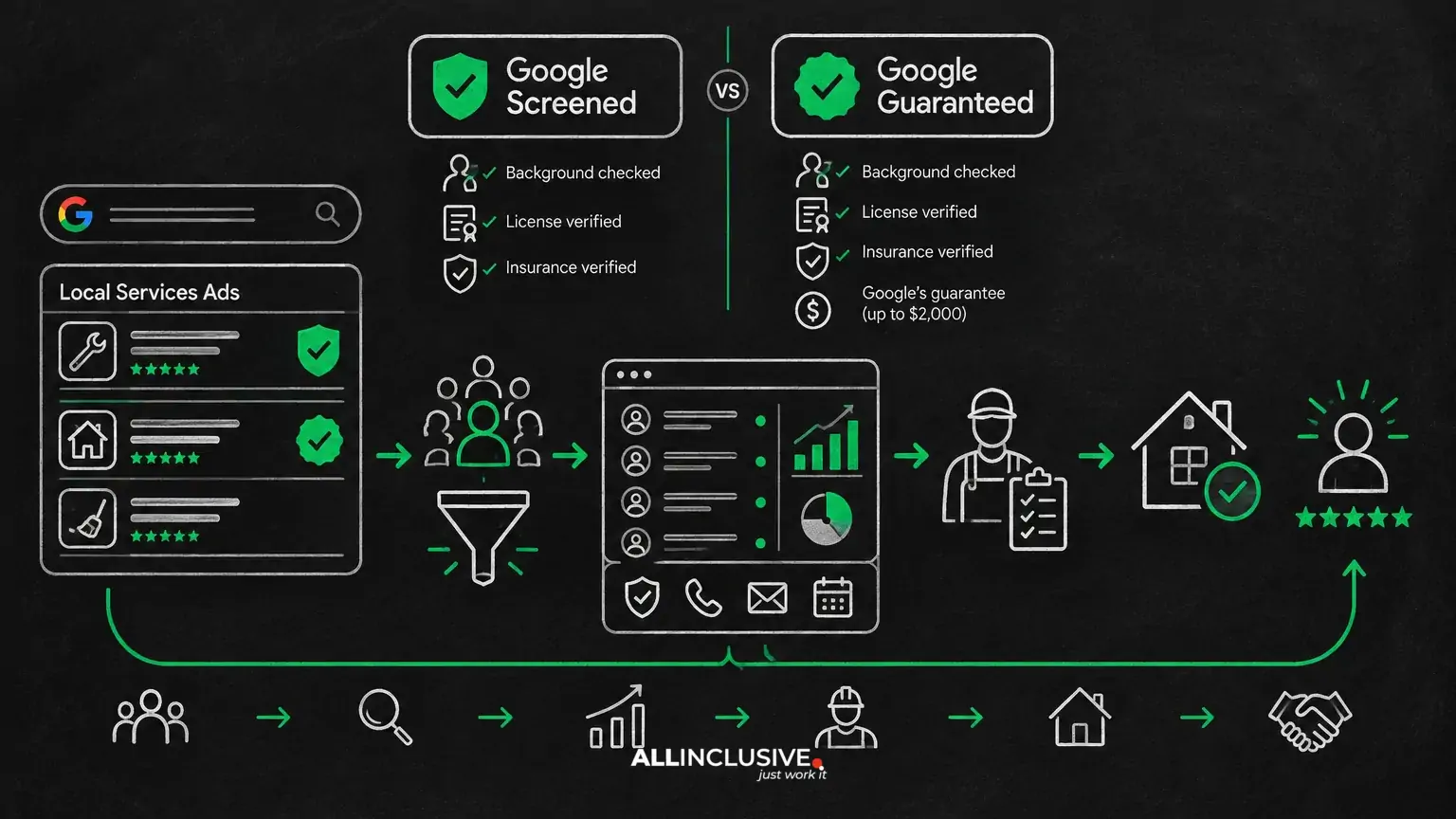
For businesses using Local Services Ads, the difference between Google Screened and Google Guaranteed is mainly the type of trust signal Google displays and the eligibility process attached to it. Neither badge is a substitute for strong reviews, accurate business information, fast lead response, or sound budget management.
Google Screened is generally associated with professional services and indicates that a business has completed relevant screening steps. Google Guaranteed is generally associated with home-service businesses and signals that the provider has completed a different verification process that may include business, license, and insurance checks, depending on category and market. Availability and requirements can change by service category, location, and platform policy, so businesses should confirm current requirements during setup.
Google Screened vs. Google Guaranteed at a glance
- Google Screened: commonly used for selected professional services, where credentials, licensing, background checks, or other category-specific checks may be relevant.
- Google Guaranteed: commonly used for selected home-service categories, where business verification and trade-related documentation may be part of eligibility.
- Shared purpose: both badges help communicate that a business has completed Google’s applicable verification process.
- Not a ranking guarantee: either badge is only one part of the auction, profile, and lead-generation environment.
- Not a substitute for diligence: customers should still evaluate reviews, scope, pricing, availability, and fit.
The important distinction is not that one badge is universally “better.” The relevant question is whether your business and category qualify for a particular program and whether the associated trust signal supports your customer’s buying decision.
What is Google Screened?
Google Screened is a trust designation used in certain Local Services Ads categories, particularly some professional services. The screening process is intended to verify that an eligible provider meets requirements relevant to its business type and market.
Depending on the category and location, screening can involve information such as business details, professional credentials, licenses, insurance, or background checks. These requirements are not universal across every screened category, so avoid treating the badge as proof of a single standardized review process.
What the Google Screened badge can communicate
For a prospective client, the badge can reduce uncertainty at the initial discovery stage. It may indicate that Google has reviewed information associated with the provider and that the business passed the requirements applicable to its category.
That signal can be especially relevant when a customer is comparing professionals whose services involve credentials, sensitive matters, or a high level of perceived risk. However, the badge does not communicate your experience level, responsiveness, pricing, specialization, or suitability for a specific project.
What is Google Guaranteed?
Google Guaranteed is a trust designation commonly associated with eligible home-service providers in Local Services Ads. The provider must complete Google’s applicable verification steps, which can include business verification and documentation related to licensing or insurance.
Requirements vary. A business should rely on the onboarding instructions for its category and service area rather than assuming that a requirement from one trade applies to another. Documentation may also need to remain current for the profile to stay eligible.
What the Google Guaranteed badge can communicate
The badge can help a customer feel more comfortable contacting a provider for work performed in or around their property. It is a platform-level trust signal, not an independent recommendation of every job, quote, or outcome.
Home-service buyers should still confirm the provider’s scope, service area, availability, written estimate, warranty terms, and any locally required licenses before hiring. Businesses should make those details easy to find and discuss them clearly when responding to leads.
Key differences between Google Screened and Google Guaranteed
1. Typical service categories
Google Screened is more commonly connected with professional-service categories. Google Guaranteed is more commonly connected with home-service categories. The exact list of eligible services is market-specific, and not every business can select its preferred badge.
2. Verification requirements
The verification path depends on the category. A professional service may need to provide credentials or complete background-related checks, while a home-service provider may need to submit business, license, or insurance information. The practical implication is that the badge should be viewed as the result of category-specific eligibility—not a marketing label a business can freely choose.
3. Customer expectations
Customers may interpret the badges differently based on the type of service they are buying. A client choosing a lawyer, financial professional, or real-estate provider may focus on credentials and professional standing. A homeowner may focus on property access, workmanship, insurance, and the provider’s ability to complete the job.
4. Operational responsibility
Verification does not end the marketing task. Businesses must keep their profile information accurate, monitor lead quality, respond promptly, and ensure that sales conversations match the services represented in the ad. A badge can create an initial click or call, but operations determine whether the lead becomes revenue.
Does one badge perform better?
There is no reliable, universal conclusion that Google Screened consistently outperforms Google Guaranteed, or vice versa. Performance depends on category, competition, location, budget, reviews, profile completeness, response speed, service fit, and the quality of the customer experience.
It is also important to separate platform eligibility from campaign performance. Passing a verification process may allow a business to participate or display a badge, but it does not guarantee lead volume, lead quality, position, conversion rate, or return on ad spend.
For a practical evaluation, track the full path from inquiry to revenue:
- Measure leads by source and service type.
- Separate valid inquiries from spam, duplicates, out-of-area requests, and services you do not offer.
- Record contact rate and time to first response.
- Track booked appointments, estimates, consultations, and closed jobs.
- Compare cost per qualified opportunity and cost per acquired customer—not only cost per lead.
- Review cancellation, no-show, refund, and repeat-business patterns where relevant.
This measurement approach is more useful than treating the badge itself as a performance guarantee. For a broader budgeting framework, see how to evaluate whether Local Services Ads are worth it.
How to choose the right approach
In most cases, the business does not choose between Screened and Guaranteed as two interchangeable campaign settings. Google determines which trust designation applies based on the available category and the verification requirements in the relevant market.
Use this decision process:
- Confirm category eligibility. Identify the exact service category and service area you plan to advertise. Do not assume a badge available to a neighboring category is available to yours.
- Prepare accurate documentation. Gather business information and any current credentials, licenses, insurance records, or other documents requested during onboarding.
- Check profile consistency. Make sure your business name, phone number, website, address or service area, hours, and offered services are consistent across your customer-facing materials.
- Define lead qualification rules. Decide which jobs, clients, locations, and budgets are a fit before spending begins.
- Build a response process. Route calls and messages to someone who can respond during advertised hours. Create a practical follow-up sequence for missed calls and unanswered messages.
- Review results by business outcome. Optimize around qualified conversations, booked work, and profitable customers rather than badge visibility alone.
Implementation considerations by business type
Professional services using Google Screened
Professional firms should make credentials, practice areas, service boundaries, consultation process, and geographic coverage clear. Prospects may need reassurance that the provider handles their specific matter, not merely that the business passed a platform review.
Use the profile and landing experience to answer practical questions: Who is the service for? What happens after contact? What information should the prospect prepare? Are there minimum engagement requirements or specific locations served?
Home-service businesses using Google Guaranteed
Home-service providers should be precise about trade, job type, service radius, emergency availability, and scheduling. Broad descriptions can attract inquiries that the team cannot serve, increasing wasted spend and frustrating customers.
Before launch, align ad coverage with technician capacity. If certain jobs, neighborhoods, property types, or time windows are not profitable, define those boundaries in the operating process and in customer conversations. More detail about category and lead considerations is available in this guide to Local Services Ads for home services.
Google Screened vs. Google Guaranteed: Mistakes to Watch For
- Assuming the badge guarantees quality or results. It is a verification signal, not a promise of customer satisfaction or campaign profitability.
- Using outdated documentation. Expired or inconsistent information can create eligibility and trust problems.
- Advertising every service. Including services your team cannot sell or fulfill can reduce lead quality.
- Ignoring response speed. Paid lead opportunities lose value when calls and messages are not handled promptly.
- Measuring only lead volume. A high number of inquiries is not necessarily valuable if they are out of area, outside scope, or unlikely to close.
- Failing to explain the badge. Sales staff should be able to describe it accurately without implying a guarantee of workmanship, pricing, or outcome.
Questions to ask before launching
- Which Local Services Ads category most accurately describes the service we actually deliver?
- Which verification documents are required in our market, and when do they expire?
- Which services and locations are profitable enough to advertise?
- Who answers calls and messages, and what happens after a missed contact?
- How will we identify qualified leads and attribute booked work?
- What customer information should be included in our profile and follow-up process?
For a structured pre-launch process, use the Local Services Ads launch checklist. If cost control is the immediate concern, review the guidance on Local Services Ads budget, bidding, and lead economics.
The bottom line
Google Screened and Google Guaranteed serve similar broad purposes but apply to different types of Local Services Ads businesses and verification paths. Screened is generally associated with selected professional services; Guaranteed is generally associated with selected home-service providers. The correct designation depends on category, location, and current platform requirements.
Treat the badge as one trust input within a larger acquisition system. Verify eligibility, keep documentation current, define a profitable service area, respond quickly, and judge performance by qualified opportunities and revenue. That approach gives the trust signal its proper role: helping customers make an initial decision without confusing platform verification with a guarantee of business performance.
For context on how Local Services Ads fit into a broader acquisition program, explore Local Services Ads strategy and management and the wider paid media resource hub.


