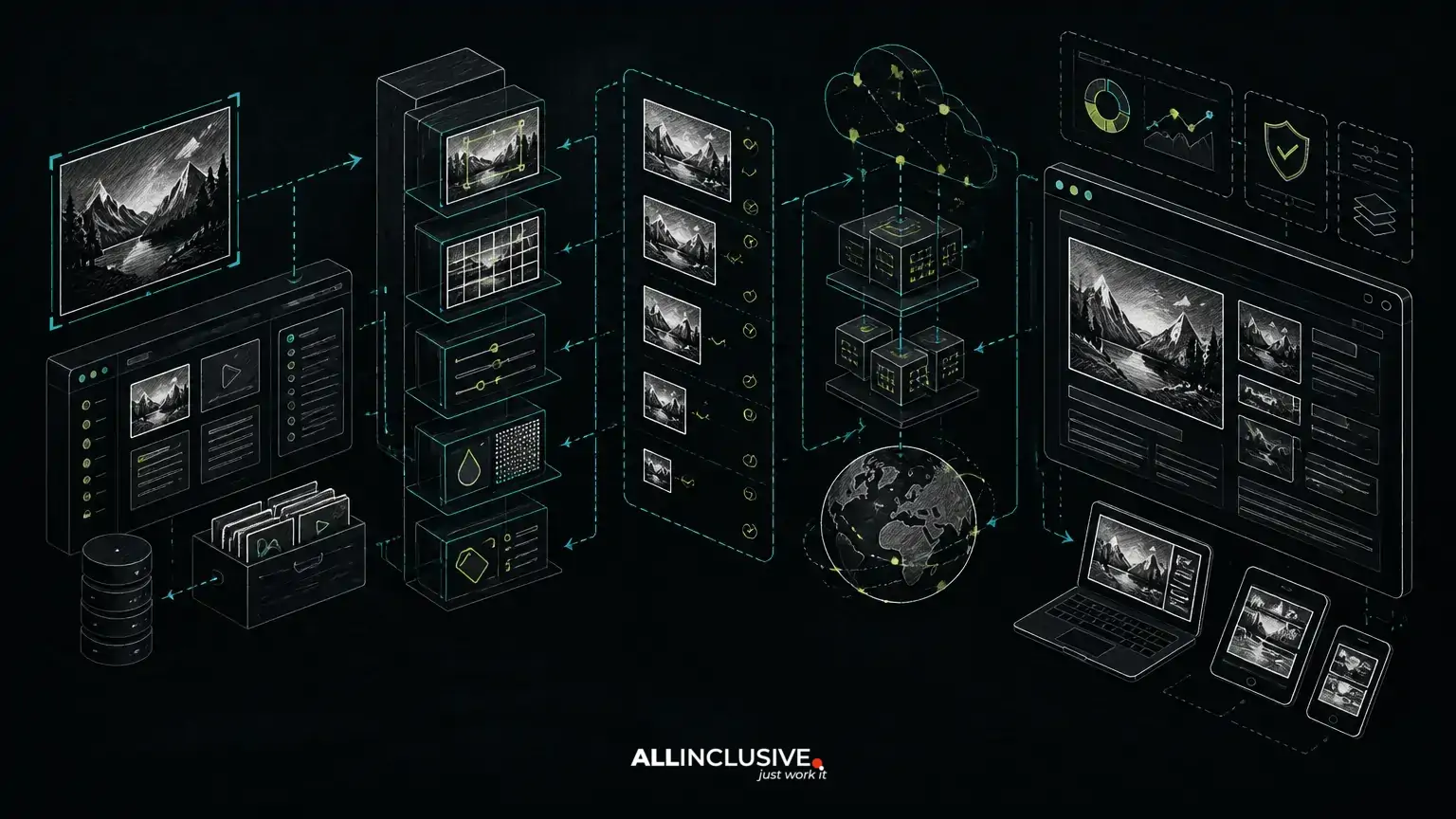
A custom CMS image media pipeline should do more than store uploaded files. It should turn an original asset into appropriately sized, compressed, accessible and cacheable variants while preserving editorial control and search visibility. The best design connects the upload workflow to image processing, responsive rendering, metadata, canonical asset handling and operational monitoring.
This matters because media decisions affect several systems at once. Oversized images increase transfer costs and slow page rendering. Missing dimensions can cause layout movement. Poorly managed variants create duplicate files and maintenance overhead. Weak editorial controls can produce inaccessible images, inconsistent filenames and pages that are difficult for search engines to interpret.
For a custom-made CMS, the pipeline can be designed around the organization’s content model and publishing workflow rather than retrofitted around a generic media library. Laravel and PHP are suitable choices for the application layer, while object storage, background workers and a CDN can handle processing and delivery at scale. The implementation should remain modular so that image processing providers or infrastructure can change without forcing a CMS rewrite.
Start with an explicit media asset model
The first architectural decision is to separate the original asset from the generated delivery variants. The original should be treated as a source file, not necessarily as the file served to visitors. A media record can store ownership, upload status, dimensions, file type, checksum, accessibility fields, focal-point data, licensing information and processing state.
A useful model commonly includes:
- Asset: the logical media item that editors select in the CMS.
- Original: the uploaded source preserved for future transformations or downloads.
- Variant: a generated file with a defined width, format, quality policy and crop mode.
- Usage: the relationship between an asset and a page, field, component or campaign.
- Delivery metadata: URLs, dimensions, byte size, content type and cache version.
This separation prevents a common failure mode: allowing templates to construct arbitrary filenames and processing rules at render time. Instead, the application can request a known variant policy, verify that it exists and return predictable markup.
Define image variants by layout requirements
Responsive images work best when variants reflect real display contexts. A marketing hero, article lead image, card thumbnail and social sharing image rarely need the same dimensions or crop behavior. Creating every possible width is wasteful, but creating only one large file forces browsers to download more data than necessary.
Define a controlled set of variant profiles, such as:
- Article lead: a wide crop or proportional resize used near the top of an article.
- Content width: a set of widths matching the primary reading column.
- Card thumbnail: a fixed aspect ratio with a documented focal-point policy.
- Square or portrait card: a separate crop for components that require consistent geometry.
- Social image: an explicitly sized asset for sharing metadata, not necessarily for page rendering.
Each profile should document maximum width, height or aspect ratio, crop mode, quality policy, permitted formats and whether the original composition must be preserved. This turns image behavior into a maintainable product rule instead of a collection of template-specific exceptions.
Use WebP conversion without treating format as the whole strategy
WebP can reduce image payloads compared with many traditional formats, but conversion alone does not solve image performance. A smaller format can still be unnecessarily large if a 3,000-pixel image is delivered to a 400-pixel card. The pipeline should make dimensions, compression and delivery selection first-class concerns.
A practical conversion flow is:
- Validate the uploaded file and inspect its actual content rather than trusting only the filename extension.
- Read dimensions, orientation and color information.
- Normalize orientation so that display behavior is consistent across browsers and tools.
- Generate approved widths and crop variants from the original.
- Encode delivery formats according to a defined quality policy.
- Record the output’s dimensions, content type, byte size and processing version.
- Publish the asset only when required variants are available or a documented fallback exists.
The pipeline may support WebP alongside another modern format where the browser and product requirements justify it. Avoid embedding format assumptions throughout templates. A media presenter or rendering component should choose an appropriate source while retaining a reliable fallback and correct dimensions.
Generate responsive HTML from CMS metadata
The CMS should provide enough information for templates to render responsive images consistently. A typical image component may use a picture element when format selection or art direction is needed, and an img element with srcset and sizes when the same image composition is used at different widths.
The important point is that the browser needs useful choices. The srcset candidates should correspond to generated variants, while sizes should describe the image’s expected layout width at relevant breakpoints. If the values do not match the CSS layout, the browser may select an inefficient file.
Every meaningful image should also receive:
- Intrinsic
widthandheightvalues to help reserve layout space. - Alternative text supplied through the editorial workflow when the image conveys information.
- An empty alternative attribute when the image is purely decorative.
- Lazy loading only where it is appropriate for the image’s position and user experience.
- A deliberate fetch priority policy for prominent above-the-fold imagery.
Do not make alternative text a filename or an automatic description by default. AI-assisted suggestions can help editors draft descriptions, but publication should remain subject to human review and content context. This is especially important for charts, product screenshots, instructional images and images with legally or editorially significant details.
Keep image SEO connected to page architecture
Media optimization is part of a broader SEO implementation, not an isolated compression task. The image URL, surrounding content, caption, alternative text, structured data and page indexing status should support the same content intent.
In a custom CMS, media-related SEO controls can include:
- Stable asset URLs with versioning that does not change on every page render.
- Canonical page URLs that prevent parameterized or temporary media routes from becoming indexable duplicates.
- Open Graph and other social image fields that are distinct from in-content image selections when necessary.
- Image sitemap inclusion rules for assets that are public, meaningful and associated with indexable pages.
- Structured data references that point to appropriate image variants or stable public asset URLs.
- Robots and access rules that do not accidentally block required image resources.
Whether standalone image URLs should be indexed is a product and content decision. Many sites primarily need images to support the indexability and experience of their HTML pages. The CMS should therefore define a policy rather than exposing every derivative through an automatically indexable route.
For a wider view of the system, see this guide to SEO-friendly custom CMS architecture, which covers how rendering, metadata, canonicals, sitemaps and editorial controls fit together.
Design storage and delivery as separate responsibilities
The application should not have to serve every large image directly from the web process. A typical architecture stores originals and variants in object storage, then delivers public variants through a CDN or an equivalent caching layer. The CMS manages records and permissions; workers handle processing; the delivery layer handles repeated public requests.
This separation improves maintainability and operational control. It also makes it easier to replace a processing library, move storage providers or introduce a new CDN without changing editorial records. Public URLs should be generated through a delivery abstraction rather than hard-coded across templates.
Use content-aware cache versioning. When an asset is replaced, the system needs a predictable way to prevent stale variants from remaining indefinitely. Possible approaches include immutable variant keys derived from an asset version or checksum, along with lifecycle rules for obsolete files. The right approach depends on cache policy, storage cost and whether existing published URLs must remain valid.
Make asynchronous processing visible to editors
Image transformations can be CPU- and memory-intensive, particularly for large originals or multiple crop profiles. Running all processing inside the upload request creates timeouts and leaves editors unsure whether an asset is ready. A background job model is usually more resilient.
The CMS should expose processing states such as uploaded, validating, processing, ready, failed and quarantined. Failed jobs should retain an actionable error and support safe retry behavior. Publishing rules can then prevent a page from referencing a missing required variant, or provide a documented fallback while processing completes.
Operational safeguards should include:
- Maximum upload dimensions and file sizes appropriate to the product.
- Validation against malformed or unsupported files.
- Resource limits for image decoders and transformation workers.
- Idempotent jobs so retries do not create uncontrolled duplicate records.
- Observability for queue latency, processing failures and unusual output sizes.
- Lifecycle rules for abandoned uploads and unused generated variants.
These controls protect both infrastructure and editorial trust. If editors repeatedly see missing previews or inconsistent crops, they will work around the CMS, creating the very asset sprawl the pipeline was intended to prevent.
Support art direction without multiplying complexity
Responsive sizing changes the dimensions of an image; art direction changes the composition. A desktop hero may retain a wide landscape crop while a mobile layout needs a tighter crop centered on the subject. The CMS can support this through explicit focal-point selection or separate editorial crops.
Do not introduce free-form cropping everywhere. Define which components support art direction, which crop profiles are available and what happens when an editor does not provide a focal point. A focal point can guide automated crops, while an editor-approved crop may be necessary for high-visibility content.
For programmatic pages, crop rules should be deterministic. Combining arbitrary data with unrestricted image transformations can produce inconsistent pages, expensive processing and weak visual quality. A template should select from approved profiles and fall back predictably when a source asset is incomplete.
Plan migration, replacement and deletion behavior
Media systems often fail during ordinary content changes rather than initial upload. Replacing an image, unpublishing a page or deleting a media record can affect caches, social previews, historical content and references in other entries.
Before implementing deletion, decide whether an asset is shared, whether old URLs must redirect or remain available, and whether derivatives can be removed immediately. A usage table or reference scan can identify dependencies. Soft deletion and delayed cleanup may be safer than immediate physical removal, particularly when publishing workflows or external integrations retain asset URLs.
Migration also deserves a defined plan. Existing files may lack dimensions, accurate alternative text, licensing records or consistent filenames. Import them into the asset model first, then process them through the same variant and validation rules used for new uploads. Treat exceptions as visible data-quality tasks rather than silently bypassing the pipeline.
A delivery checklist for a custom CMS image pipeline
- Can the system distinguish originals, logical assets and generated variants?
- Are variant profiles based on actual component and layout requirements?
- Does WebP conversion accompany responsive sizing and compression decisions?
- Are dimensions, alternative text, captions and focal points available to editors?
- Does rendered markup use correct
srcset,sizesand loading behavior? - Are public asset URLs stable, cacheable and independent of application internals?
- Can workers retry safely and expose failures to editors and operators?
- Are image sitemap, structured data, canonical and indexation policies explicit?
- Can the system identify shared usage before replacement or deletion?
- Are generated files and processing versions observable over time?
A well-designed pipeline turns media from a recurring source of page weight, accessibility defects and editorial friction into a governed platform capability. When image rules are built into a custom CMS, the organization owns the relationship between content modeling, responsive rendering, SEO controls and delivery infrastructure instead of managing disconnected plugins and manual workarounds.
The implementation can be part of a broader custom software development effort, especially when the CMS must support complex editorial roles, programmatic publishing or AI-assisted content operations. For multilingual systems, media fields and editorial approval rules should also align with locale architecture; the related guide on multilingual custom CMS architecture addresses those workflow considerations.